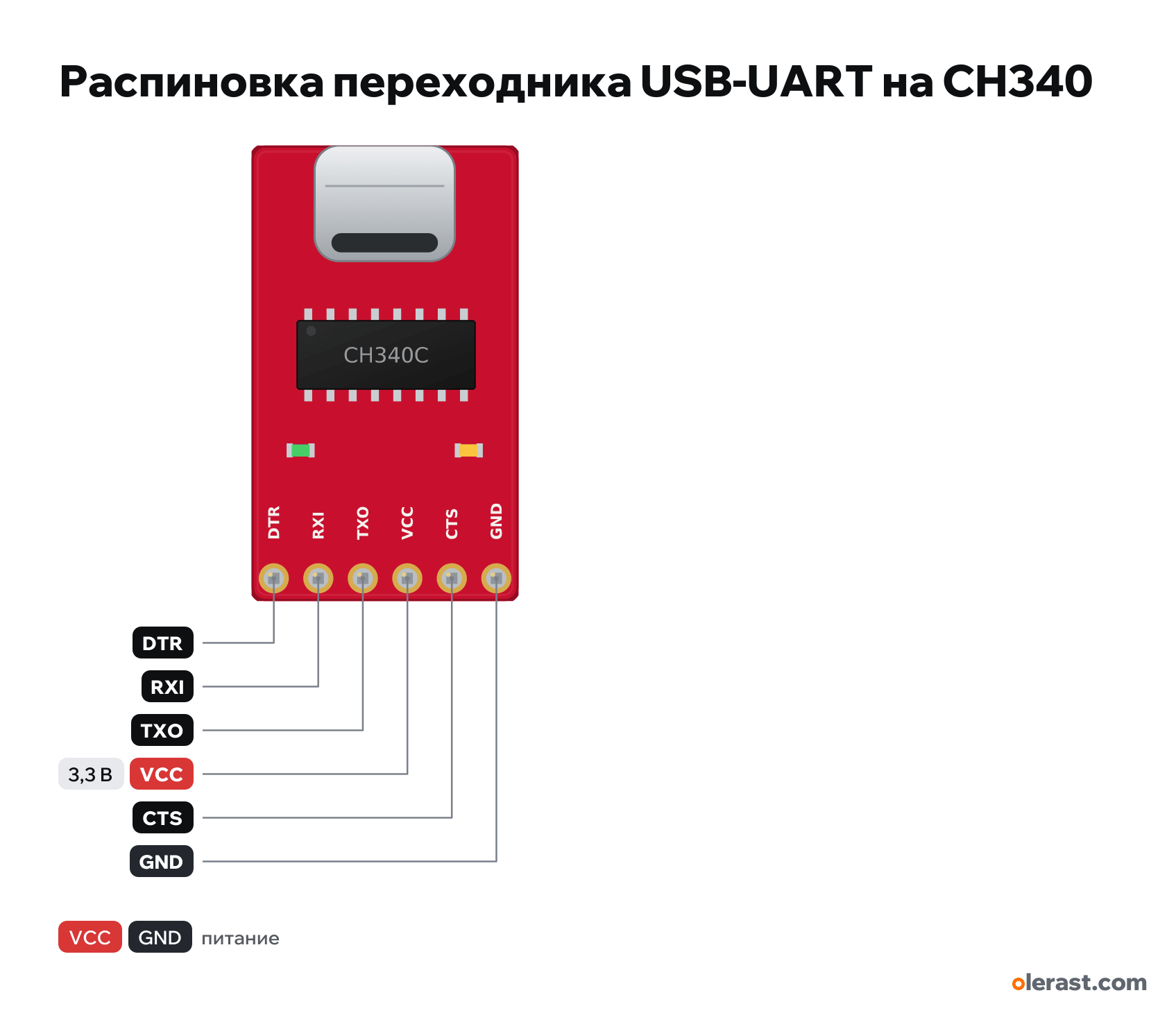
USB-UART adapter on CH340C pinout
USB-UART adapter on CH340C (DTR, RXI, TXO, VCC, CTS, GND), WCH CH340C, 3.3 V logic, 15.24×26 mm, 6 pins
partly verified20.10.2026
Top view, USB-C on top, header on the bottom: DTR, RXI, TXO, VCC, CTS, GND from left to right.
Download PNG- Chip
- WCH CH340C
- Logic
- 3.3 V
- Power
- USB-C 4.75-5.25 V
Important
- The lines cross over: TXO to the board's RX, RXI to the board's TX, GND to GND.
- The signal level equals VCC: 3.3 V by default (suits ESP32, ESP8266, STM32). For 5 V Arduino move the jumper on the back to 5 V.
- Flashing an Arduino Pro Mini: the header plugs in directly (GND to GND, DTR to DTR), auto-reset works through the capacitor on the Pro Mini.
- ESP32 and ESP8266 without auto-reset: before flashing hold BOOT (GPIO0 to GND) and press EN or RST.
- If there is no port: the cable is charge-only or the CH340 driver is missing (Windows 10 and 11 usually install it automatically).
- VCC outputs 3.3 V (up to 600 mA) or 5 V from USB: selected with a jumper on the back, which also sets the level of TXO, RXI and DTR.
Revisions and clones
- SparkFun Serial Basic on CH340G (DEV-14050): micro-USB, same header.
- Blue adapters labeled 5V, VCC, 3V3, TXD, RXD, GND with a VCC jumper: different pinout, VCC is jumpered to 5V or 3V3.
- Chips separately: ch340g-sop16 and ch340c-sop16.
All pins
| Label | Number | Functions | Limits | Check |
|---|---|---|---|---|
| DTR | DTR: output, active low; Arduino auto-reset through 0.1 µF | not from manufacturerThe order DTR, RXI, TXO, VCC, CTS, GND is from the SparkFun guide, but which edge DTR is on in the top view was not checked against the photo; the board size is approximate. Clones labeled 5V, VCC, 3V3, TXD, RXD, GND have a different pinout.Pro Mini and similar boards: DTR goes to the board's DTR (GRN) pin, which already has a capacitor on RESET. | ||
| RXI | RXI: UART input, to the board's TX | not from manufacturerThe order DTR, RXI, TXO, VCC, CTS, GND is from the SparkFun guide, but which edge DTR is on in the top view was not checked against the photo; the board size is approximate. Clones labeled 5V, VCC, 3V3, TXD, RXD, GND have a different pinout.Level set by the VCC jumper: 3.3 V by default. For 5 V boards move the jumper to 5 V.Labelled on other revisions as: RXD, RX | ||
| TXO | TXO: UART output, to the board's RX | not from manufacturerThe order DTR, RXI, TXO, VCC, CTS, GND is from the SparkFun guide, but which edge DTR is on in the top view was not checked against the photo; the board size is approximate. Clones labeled 5V, VCC, 3V3, TXD, RXD, GND have a different pinout.Labelled on other revisions as: TXD, TX | ||
| VCC | 3.3 V | power output | not from manufacturerThe order DTR, RXI, TXO, VCC, CTS, GND is from the SparkFun guide, but which edge DTR is on in the top view was not checked against the photo; the board size is approximate. Clones labeled 5V, VCC, 3V3, TXD, RXD, GND have a different pinout.3.3 V (default) or 5 V by the jumper on the back. At 3.3 V the regulator gives up to 600 mA.Labelled on other revisions as: 3V3, 5V | |
| CTS | CTS: input, active low (usually not needed) | not from manufacturerThe order DTR, RXI, TXO, VCC, CTS, GND is from the SparkFun guide, but which edge DTR is on in the top view was not checked against the photo; the board size is approximate. Clones labeled 5V, VCC, 3V3, TXD, RXD, GND have a different pinout. | ||
| GND | Ground | not from manufacturerThe order DTR, RXI, TXO, VCC, CTS, GND is from the SparkFun guide, but which edge DTR is on in the top view was not checked against the photo; the board size is approximate. Clones labeled 5V, VCC, 3V3, TXD, RXD, GND have a different pinout. |
Sources
Not verified against the manufacturer: 6 of 6 pins. The pin card says what confirms each one and where sources disagree.
- SparkFun Serial Basic Breakout (CH340C and USB-C) Hookup Guideuser guide, checked 20.10.2026pins DTR (output, active low), RXI (input), TXO (output), VCC (3.3 V by default or 5 V), CTS (input, active low), GND; the jumper on the back selects 3.3 or 5 V (default 3.3); 3.3 V regulator up to 600 mA, 150 mA on overload; at 5 V it passes USB current; TX (green) and RX (yellow) LEDs
- SparkFun: How to Install CH340 Driversthird-party source, checked 20.10.2026CH340 driver for Windows, macOS, Linux
Size: size and details from the SparkFun photo, not dimensioned (approximate).
FAQ
- What supply voltage does the USB-UART adapter on CH340C need?
- USB-C: 4.75-5.25 V. 3.3 V logic.